
Shift rota and working time record: not the same thing
Companies that work in shifts deal with two things that are easy to mix up:
- The rota says who was supposed to work, on which day and on which schedule. It is the plan.
- The working time record shows when each person actually started and finished. It is what happened.
Spanish law requires the record, but without the rota you cannot tell whether someone arrived late, worked extra hours, or whether a day with no clock-ins was a day off or a missed clock-in. That is why it makes sense for both to live in the same app: the planned shift is compared with the clock-ins, and any shift change is reflected in the hours without manual work.
What Spanish law says about shift work
The Workers' Statute (Estatuto de los Trabajadores) contains several rules that directly affect how shifts are organised:
- Daily working time record (art. 34.9): the company must record each employee's start and finish time every day and keep the records for four years, also with rotating or night shifts.
- Work calendar (art. 34.6): every year the company must draw up the work calendar and display it somewhere visible in each workplace.
- Rest between working days (art. 34.3): at least twelve hours must pass between the end of one working day and the start of the next. This matters when someone closes at night and opens the next morning.
- Weekly rest (art. 37.1): at least a day and a half without interruption, which can be accumulated over periods of up to fourteen days.
- Irregular distribution (art. 34.2): when working hours are distributed irregularly, employees must know the day and time of work at least five days in advance.
- Shift work (art. 36.3): work organised so that employees successively fill the same posts following a continuous or discontinuous pattern, at different times over a period of days or weeks.
In addition, each sector's collective agreement (hospitality, retail, cleaning, healthcare…) usually sets rules on publishing the rota, shift changes and rest. It is worth checking before building the rota.
Types of shifts and how to record each one
Fixed shifts. Each person always works the same hours, for example 8:00 to 15:00. A weekly calendar is enough.
Rotating shifts. The team moves through morning, afternoon and night following a repeating pattern, for example every two weeks. The usual approach is to define the cycle once and apply it to each employee with their own starting day.
Split shift. The working day has two blocks with a long break in between, such as 9:00-13:00 and 16:00-20:00. Each block has to be recorded and the break must not count as working time.
Night shift. It starts one day and ends the next, such as 22:00-06:00 or 17:00-00:00. The classic mistake is a system that cuts the working day at midnight and splits it into two days. The working day must be recorded in full and assigned to the day it started.
Variable shifts. Very common in hospitality and retail: the manager decides every week who opens, who closes and who is off, depending on bookings, events or holidays. There is no fixed pattern, so the tool has to make week-by-week planning quick.
Flexible schedule. No fixed start or finish time. The actual working day is still recorded, and the planned hours adapt to the hours worked.
From a spreadsheet rota to a shift app
Many companies start with a spreadsheet, and for a small, stable team it can work. The problems start when things change:
- The spreadsheet does not know who has clocked in, so the rota and the record are compared by hand at the end of the month.
- Every last-minute change means sending the file again, and nobody is sure which version is the right one.
- Holidays, bank holidays and sick leave are tracked somewhere else.
- There is no record of who changed a shift or when.
With a shift-based time tracking app, the rota and the clock-ins share the same data: the manager plans, the employee clocks in and the system calculates planned hours, worked hours and the difference.
How shifts work in etempus
etempus lets you combine several ways of assigning schedules depending on how each team works:
- Weekly calendar for people who always work the same hours.
- Rotating shifts: you define a cycle of as many days as you need, with the schedule for each day, and the system generates it automatically for each employee over a date range, starting on their day of the cycle. You can also copy one employee's shifts to another or assign them by hand.
- Weekly shift planning, the new feature, for teams that change every week.
- Monthly assignment of one person's calendar, handy when shifts run by weeks or in long cycles.
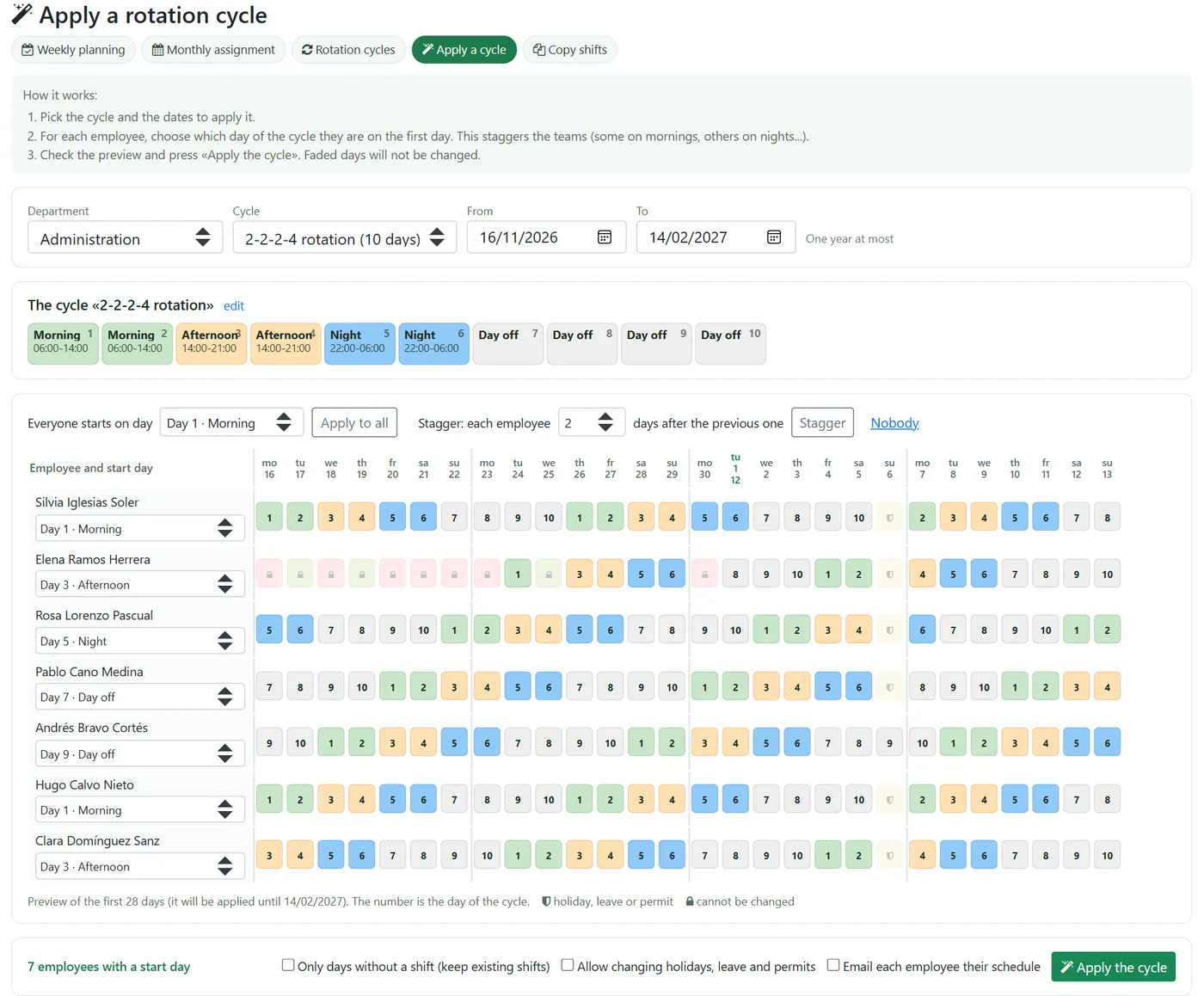
Schedules can have up to four time blocks (useful for split shifts), be flexible, or be marked as finishing on another day, so a night shift is not cut at midnight or closed by the automatic end-of-day closing.
Whichever way it is assigned, the shift of the day is the one used for clocking in, planned hours, counters and reports, and also to detect days without clock-ins: a day off does not count as a missed clock-in.
New weekly shift planning
It is a table with the department's employees in rows and the days of the week in columns. Each cell shows that day's shift in its colour, and the planned hours for the week appear at the end of each row.
- Pick a shift from the palette (morning, afternoon, night, day off…). The ones the team uses come first and the rest are in a drop-down.
- Click on the days, or drag to paint several in a row.
- Check each person's weekly hours and press Save.
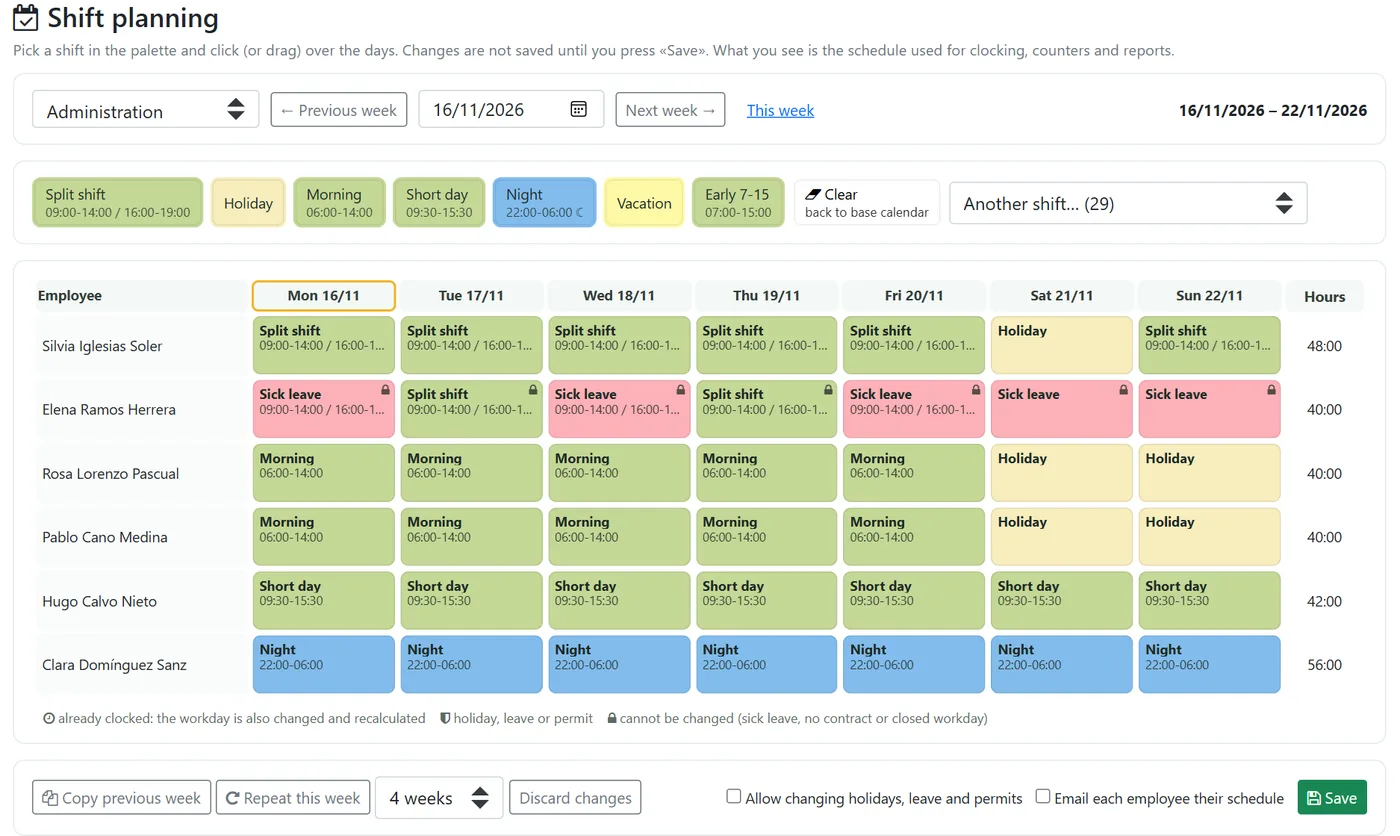
So you do not start from scratch every week:
- Copy previous week suggests last week's shifts, so you only adjust what changes.
- Repeat this week copies a planned week to the following ones, up to twelve weeks at once.
Holidays, bank holidays and approved leave are respected (they only change if you explicitly allow it) and sick leave days cannot be changed.
Last-minute changes and notifying employees
In real life shifts change: someone falls ill, there is an event or two colleagues swap. With etempus:
- You can change the shift of a day that has already been clocked, for example if it was planned wrongly. The working day moves to the new schedule and the hours are recalculated with the existing clock-ins.
- When saving, you can choose to send each employee their weekly schedule by email, a single message per person with all their days.
- Each planned day stores who planned it and when, and changes to days already clocked are recorded with the previous value.
Example: a bar with morning, afternoon and night shifts
Take a bar with five waiters and these shifts:
- Morning: 9:00 to 16:00.
- Afternoon: 16:00 to 23:00.
- Night: 17:00 to 23:00, or 17:00 to 00:00 on busy days.
The shifts follow no pattern: the manager decides them every week. In etempus these schedules are created once (the night shift ending at 00:00 marked as finishing on another day), plus a day-off schedule. Every Monday the manager opens the planning, copies the previous week, changes the days that do not fit and saves with the email option. Each waiter clocks in from their phone and the system compares the clock-ins with that day's shift.
What to ask from a shift-based time tracking app
- The rota and clock-in in the same tool.
- Support for split shifts and night shifts without cutting the day at midnight.
- Rotating patterns as well as week-by-week planning.
- Holidays, bank holidays and sick leave respected when planning.
- Changing a shift that has already been clocked, with hours recalculated.
- Employees knowing their schedule in advance.
- A record of who made each change.
- Managers able to plan only their own team.
If you are reviewing your legal obligations, see our practical guide to the time-tracking law, the mandatory digital time tracking guide and what to do when an employee does not clock in.
Frequently asked questions
Is a shift rota mandatory in Spain?
How do you record a night shift that goes past midnight?
How much rest must there be between two shifts?
Can you change a shift that has already been clocked?
Is a spreadsheet rota enough for time tracking?
How do employees find out their shift?
Do you organise shifts every week? We will show you how to plan the rota and track your team's clock-ins with etempus.
Contact us on WhatsApp